
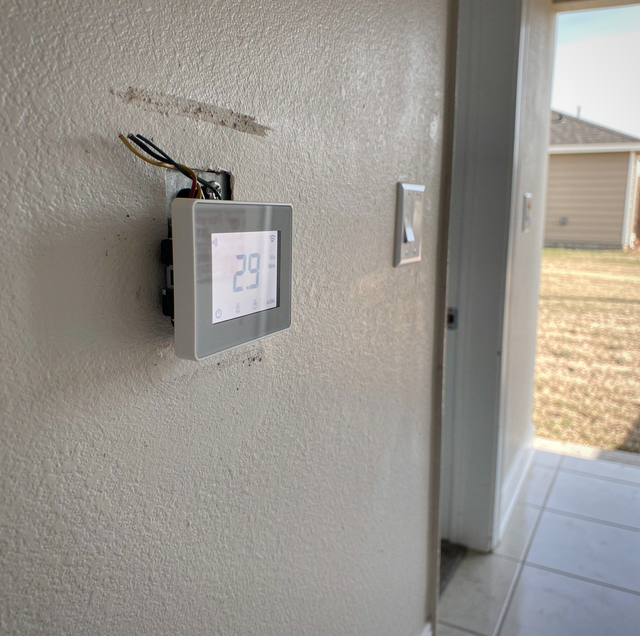
Quick Answer: The C-wire ("common wire") completes the low-voltage circuit that carries continuous 24V power to your thermostat. Smart and Wi-Fi thermostats need that steady power to run their display and connectivity. Battery and older mechanical thermostats usually did not. If you lack a C-wire, options include repurposing a spare wire, running a new one, or using an add-a-wire adapter or power-extender module.
A C-wire, short for "common wire," gives your thermostat a steady, always-on supply of 24-volt power. That constant trickle is what keeps a modern thermostat's screen lit, its Wi-Fi radio online, and its features running around the clock, even when the heating and cooling equipment is sitting idle. If you have shopped for a smart or Wi-Fi thermostat and read the words "C-wire required" in the fine print, this is the wire the manufacturer is asking about.
Older mechanical and battery-powered thermostats got by without one. Newer connected models rarely do. Understanding what the C-wire actually does, and how to tell whether your home already has one, saves a lot of guessing when a new thermostat starts acting strange.
How Thermostat Wiring Works at a High Level
A thermostat is basically a set of switches. Its job is to close a circuit and tell your furnace, air conditioner, or air handler to do something. The low-voltage wires behind the thermostat each carry one of those instructions, and the letters printed at the terminals tell you which is which.
The common letters you will see:
R (power): The R terminal, sometimes split into Rh and Rc, brings 24V power up from the system's transformer. Nothing else works without it.
W (heat): Closing the circuit between R and W tells the furnace or heat source to fire.
Y (cooling): Closing R to Y signals the outdoor condenser to run for cooling.
G (fan): Closing R to G runs the indoor blower fan on its own.
C (common): The C terminal is the return path. It carries the 24V circuit back to the transformer so power can flow in a continuous loop.
The distinction that matters most is the difference between R plus C together versus R alone. When both R and C are connected, the thermostat sits inside a completed circuit, so power flows through it continuously. Without C, the thermostat only sees power in brief pulses, at the moment it closes a switch to call for heat, cooling, or fan. A simple thermostat is fine with those pulses. A smart one that needs to stay awake all the time is not.
An analogy helps here. R and C are like the two prongs of a plug in an outlet. Plug in only one prong and nothing runs. The C-wire is the second prong that closes the loop and lets electricity keep moving.
Why Old Thermostats Skipped the C-Wire and Smart Ones Need It
A classic mechanical thermostat, the kind with a mercury bulb or a bimetallic coil, drew almost no power. It did not have a screen, a processor, or a radio. It only needed to momentarily close a contact when the temperature drifted, so it could run off the brief pulse of power it got through the R and W (or Y) wires alone. No common wire required.
Battery-powered digital thermostats took a similar shortcut. The batteries ran the small display and logic, so those models also skipped the C-wire, and many still do today.
A smart or Wi-Fi thermostat is a small always-on computer. Its color touchscreen, motion sensors, and wireless connection draw power every minute of the day, not just when the system is running. A battery alone cannot keep up with that demand for long, and pulsing power through the call wires is not enough either. That steady supply through the C-wire is what keeps the device reliably powered.
Both realities can be true in the same house. An older thermostat that ran fine for years without a common wire is not evidence that your wiring includes one, and the fact that a new thermostat asks for a C-wire is not a sign anything is broken. It reflects the jump in what the device is being asked to do.
How to Tell Whether You Already Have a C-Wire
You can usually check in a few minutes without tools. First, switch the system off at the thermostat, then cut power to the HVAC equipment at the breaker or the air-handler service switch so the low-voltage wiring is not live while you look.
Pull the thermostat face off its base: Most units snap or pull straight off the wall plate, exposing a row of lettered terminals with wires screwed into them.
Look at the C terminal: If a wire is seated in the terminal marked C, you already have a common wire connected and ready. Its color is often blue, though color is not a guarantee, since installers do not always follow a standard.
Check for a spare wire in the bundle: Even with an empty C terminal, look at the cable coming out of the wall. If an extra wire is tucked behind the plate, unused and capped, you may have a spare conductor that can be turned into a C-wire at both ends.
Before you touch anything, snap a clear photo of the wiring. It gives you a reference if a wire slips, and it is exactly what a technician will want to see if you call for help.
Your Options If You Do Not Have a C-Wire
A missing C-wire is a common situation, not a dead end. There are several paths, roughly in order of simplicity.
Repurpose an existing unused wire: Many homes were wired with a cable that has more conductors than the old thermostat used. If a spare wire runs the full distance from the thermostat to the air handler, it can be connected at the C terminal on each end and become your common wire. This is often the cleanest fix.
Run a new C-wire: If no spare exists, a new low-voltage cable can be pulled between the thermostat and the air handler. Access and drywall make this simple in some homes and involved in others.
Use a C-wire power adapter or add-a-wire kit: These small devices let a thermostat draw the steady power it needs using the wires already present, by adding a module at the air handler or piggybacking a signal on existing conductors. They can be a good match when running new wire is impractical.
Choose a thermostat that includes a power-extender module: Some smart thermostats ship with their own module that installs at the air handler and delivers the needed power over existing wiring, sidestepping the C-wire question entirely. If a common wire is likely to be a hassle in your home, a model built this way is worth prioritizing.
Symptoms of a Missing or Weak C-Wire
When a smart thermostat is installed without proper continuous power, the trouble usually shows up as intermittent, hard-to-pin-down behavior rather than a clean failure. Common signs:
The thermostat reboots, or the screen goes dark on its own, often when the system cycles on or off.
Wi-Fi keeps dropping, and the thermostat falls offline, then reconnects, then drops again.
A battery-backed model drains its battery quickly or nags for a recharge, because it is trying to top itself up by "power stealing" through the call wires.
The equipment short-cycles, turning on and off in quick bursts. A power-stealing thermostat pulls a little current through the heating or cooling circuit to charge itself, and that trickle can be enough to briefly and falsely trigger the equipment.
Short-cycling is the symptom worth taking seriously. Beyond the annoyance, rapid on-off cycling stresses compressors and blower motors and wastes energy, so a power issue that looks minor at the thermostat can shorten the life of far more expensive parts.
Why the Air-Handler Connection Is Best Left to a Pro
Thermostat wiring is low-voltage, generally 24V, so it will not shock you the way household current can. Low risk to you does not mean low risk to the equipment, though. The other end of these wires lands on the control board inside your furnace or air handler, and that board is the brain of the system.
A wire touched to the wrong terminal, a screw left loose, or a short across two conductors can blow the system's low-voltage fuse or damage the board outright. A control board costs far more to replace than a service call. That is the real reason the air-handler side of a C-wire job, whether repurposing a wire, running a new one, or wiring in a power module, is worth handing to an HVAC technician. They can confirm your transformer has the capacity to carry the added load, land each wire correctly, and verify the thermostat holds steady power before they leave.
At the thermostat wall plate, a careful homeowner can often check terminals and swap a compatible thermostat. Once the job reaches the air handler and its control board, the smarter move is usually to call for help. Before touching any wiring at either end, cut power to the system at the breaker or the air-handler switch, since a slip while the circuit is live is what fries boards and blows fuses.
Frequently Asked Questions
Some people do, but it comes with a real trade-off. Reassigning the G wire to the C terminal can deliver common power, yet it takes away independent fan control, so you lose the ability to run the blower on its own without heating or cooling. On systems that rely on a separate fan signal, or with certain thermostats, this workaround can also cause the fan to run nonstop. It is a last resort, not a first choice, and worth confirming with a technician first.
Not directly. The C-wire only supplies power to the thermostat itself, which draws a tiny amount. The indirect effect is what matters: a properly powered smart thermostat holds a stable connection and can run its scheduling and setback features reliably, and it will not short-cycle your equipment from power stealing. Stable operation and no needless cycling are where any efficiency benefit comes from.
No, and trusting color alone can lead you wrong. There are common conventions: blue or black is often the common wire, red for power, white for heat, but installers do not always follow them. Always go by the printed letter at the terminal rather than the color of the wire. Photograph the existing connections before disconnecting anything so you can restore them exactly.
Sometimes, but usually not well over the long run. A few models can run on internal batteries or by carefully drawing power through the call wires, which is why they list the C-wire as "optional." Feature-rich models with bright screens and constant Wi-Fi tend to outpace what a battery can supply, leading to the reboot and drop-off symptoms described above. When a manufacturer says a C-wire is recommended, treating it as required avoids most headaches.
The transformer that powers your low-voltage circuit is rated in VA (volt-amperes), which is its power capacity. A common older rating is 40 VA. Adding an always-on smart thermostat and sometimes a power module increases the steady load on that transformer. If the transformer is undersized or already near its limit, the added draw can cause dropouts or nuisance issues, which is one reason a technician checks transformer capacity before adding a C-wire load.
Yes, they add terminals. A heat pump typically uses an O or B wire for the reversing valve, plus an auxiliary or emergency heat terminal, and multi-stage systems add W2 or Y2 for the second stage. None of that removes the need for a C-wire on a smart thermostat; there are simply more conductors to identify correctly. That added complexity is another reason to confirm the wiring with a pro on anything beyond a basic single-stage setup.
Ask about a smart-thermostat upgrade — get the C-wire done right so your new thermostat stays powered and online. Fix My Air serves Fort Worth and the DFW metro. TACLA33709C. Call (817) 439-9811.